
Have you ever went to an online store and immediately found what you were looking for? Or landed on a website where searching for a product was confusing and frustrating?
A better header can also improve shopping cart conversions.
In most cases, the difference comes down to one thing: Navigation.
The website header plays a crucial role in how customers explore an online store. It allows shoppers to browse categories, search for products, view their account, manage their carts and navigate the buying journey with ease. The simple and innovative navigation keeps customers engaged. When that doesn’t happen, they usually leave without buying anything.
Wcart has launched its new Advanced Ecommerce Header Builder to help business owners create more flexible and customer’s friendly navigation experiences. Now, with 10 professionally-designed templates, drag-and-drop customization, and separate controls for desktop, tablet and mobile devices, businesses can create headers that fit how their customers shop.
Explore About Wcart’s Footer Builder
What Is an Ecommerce Header Builder?

An ecommerce header builder is a visual design tool that allows merchants to create and customize the navigation section of their online store without modifying code. Instead of being limited by a fixed theme layout, store owners can decide how important elements such as menus, search bars, customer accounts, wishlists, shopping carts, location selectors, and other navigation components are arranged. It acts as a central control panel for designing a navigation experience that matches the needs of both the business and its customers.
A today ecommerce websites header does much more than display a logo. It helps shoppers find products, explore categories, access important information, and move through the buying journey more efficiently. For example, an electronics store may prioritize search functionality because customers often know exactly what they want, while a fashion store may focus on category navigation to encourage browsing. An ecommerce header builder gives merchants the flexibility to adapt navigation based on how their customers actually shop.
Launch Your Ecommerce Website in Minutes With Our Easy Builder.
Benefits of Using an Ecommerce Header Builder
- Better product discovery
- Improved customer navigation
- Faster access to key store features
- Enhanced mobile shopping experiences
- Stronger brand presentation
Why Traditional Header Systems Often Create Limitations
Most ecommerce platforms depends on theme-based header systems. While themes make it easy to launch a website quickly, they often limit how much control merchants have over their navigation. As businesses grow, their website requirements change, and many store owners find that the default header structure no longer supports the way their customers shop.
Even simple changes can become surprisingly difficult. Something that should take a few minutes may require theme customization, third-party plugins, or developer assistance.
Common examples include:
- Moving the search bar to a different position
- Adding a location selector for local delivery services
- Highlighting seasonal offers or promotional campaigns
- Adding new navigation sections for expanding product categories
- Displaying customer account or wishlist options more prominently
For example:
- Grocery stores may need location selection before customers can browse products.
- Fashion retailers often want to highlight new arrivals, collections, and seasonal promotions.
- Electronics stores usually prioritize search functionality because customers often know exactly what product they need.
- B2B businesses may require quick access to account dashboards, quote requests, and bulk ordering tools.
- Marketplaces often depend on category-based navigation and advanced search features.
Read more: Explore About Wcart Fashion Theme
Introducing the New Wcart Header Builder
To give merchants greater control over their storefront navigation, Wcart has introduced its new ecommerce Header Builder feature . Instead of being limited to a fixed header layout, store owners can now customize how navigation is structured, displayed, and managed based on their business requirements.
The feature can be accessed directly from the Wcart admin panel by navigating to:
Appearance → Layout Settings → Header
Once inside the Header Settings page, merchants can enable the Header Builder and launch the visual editor with a single click.
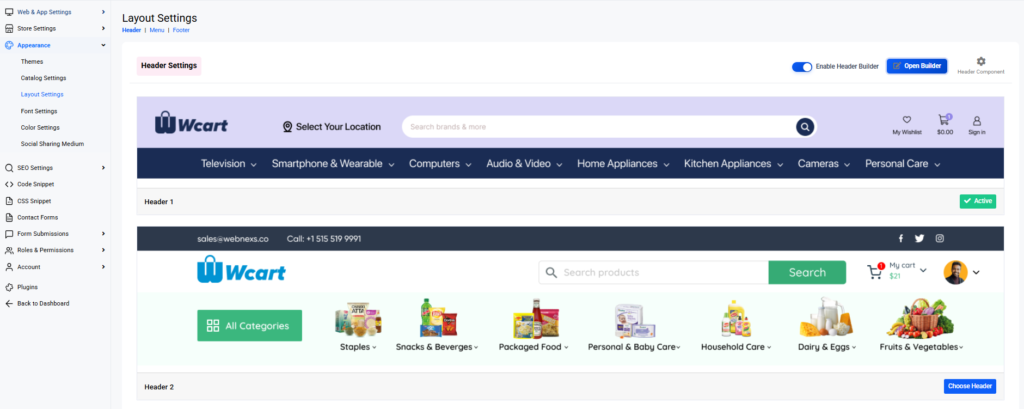
The setup process has been designed to be simple and user-friendly. Store owners no longer need to modify theme files or rely on developers to make navigation changes. Instead, they can access the builder directly from the dashboard and start customizing their header immediately.
Businesses can choose the approach that best suits their needs:
- Select a ready-made template for faster setup
- Use the Preset Builder for professionally structured layouts
- Create fully customized headers using the Custom Builder
- Design separate experiences for desktop, tablet, and mobile users
- Add, remove, and rearrange navigation elements without coding
Begin Faster with 10 Professionally Designed Header Templates
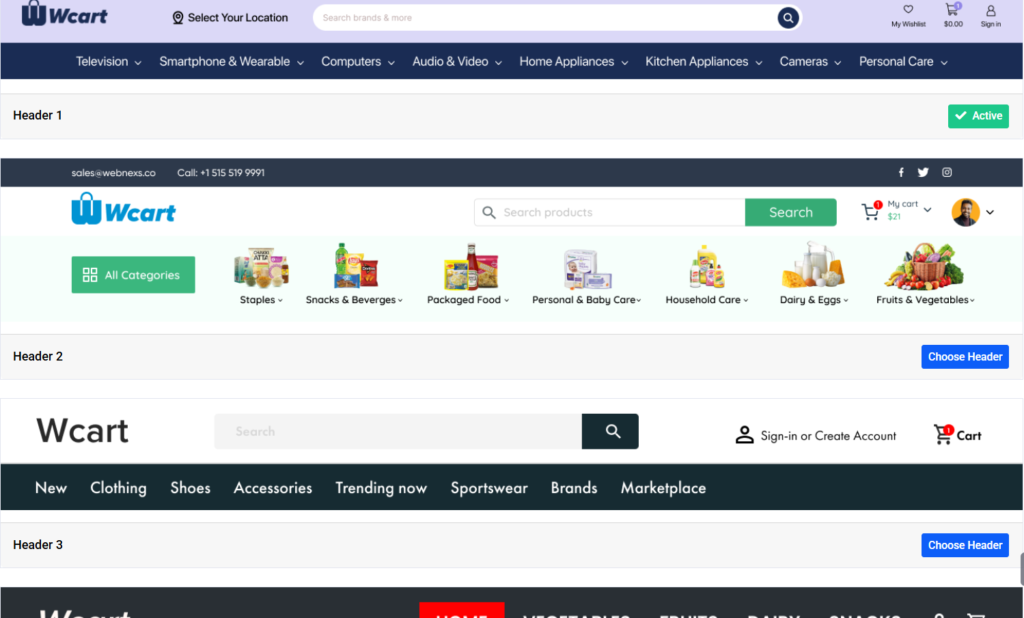
Creating an effective header isn’t always as simple as adding a logo and a menu. The placement of navigation elements can directly influence how customers interact with an online store. A poorly structured header can make product discovery difficult, while a well-organized one can help customers find what they need faster.
Questions often arise during the design process:
- Where should the search bar be positioned?
- How prominent should category navigation be?
- Should customer account access appear before other elements?
To simplify these decisions, Wcart includes 10 professionally designed header templates that provide a strong starting point for different types of ecommerce businesses.
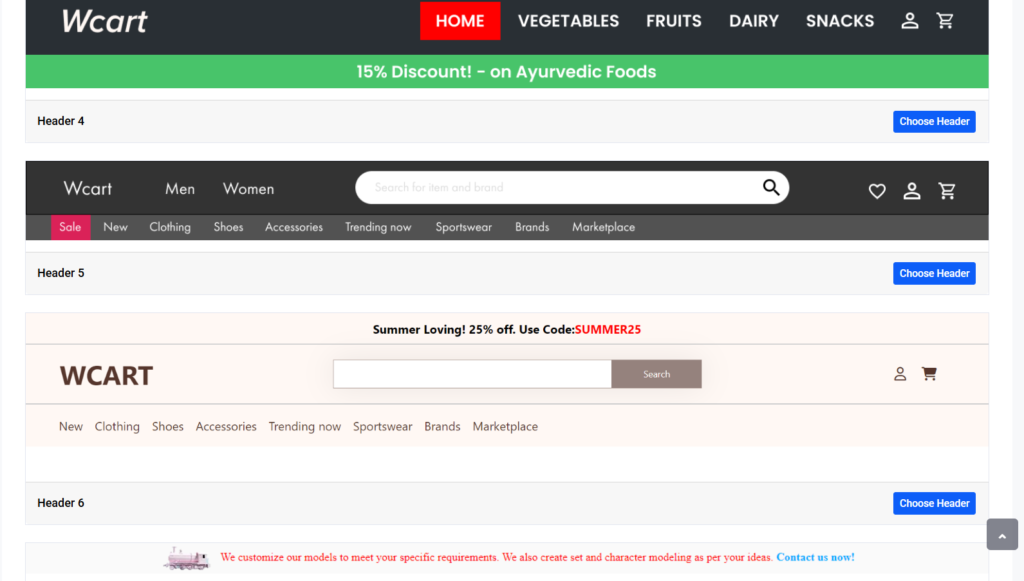
Rather than offering generic layouts, these templates are designed around common ecommerce use cases and shopping behaviors.
The goal isn’t to force merchants into a predefined structure. Instead, the templates provide professionally planned layouts that can save time while still allowing further customization through the Header Builder.
Benefits of Using Header Templates
- Faster store setup and deployment
- Reduced design and planning effort
- Professionally structured navigation layouts
- Better starting point for customization
- Reduced dependency on designers or developers
Whether you’re launching a new online store or redesigning an existing one, these templates help accelerate the setup process while ensuring that navigation remains clear, organized, and customer-friendly.
Read more: Explore About Abandoned Cart recovery Stratergies
Preset Builder: Launch Professional Headers in Minutes
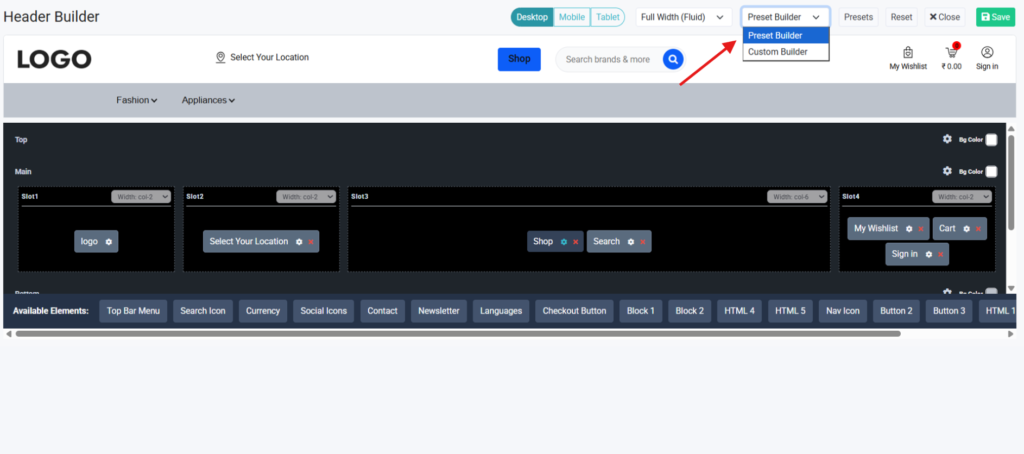
Wcart has a special Preset Builder mode for “Storefront owners can choose from predefined header layouts and apply them instantly. Users don’t have to manually organize menus, search bars, account sections and shopping tools, but can start with a professionally arranged layout and get their store up and running much faster.
This approach is particularly valuable for business owners who want to focus on selling products rather than spending hours designing navigation layouts.
The Preset Builder Is Bset For
- New ecommerce stores launching for the first time
- Startup businesses with limited resources
- Seasonal campaigns and promotional stores
- Quick website redesign projects
- Merchants without design or development experience
Custom Builder: Create Unique Headers Without Coding
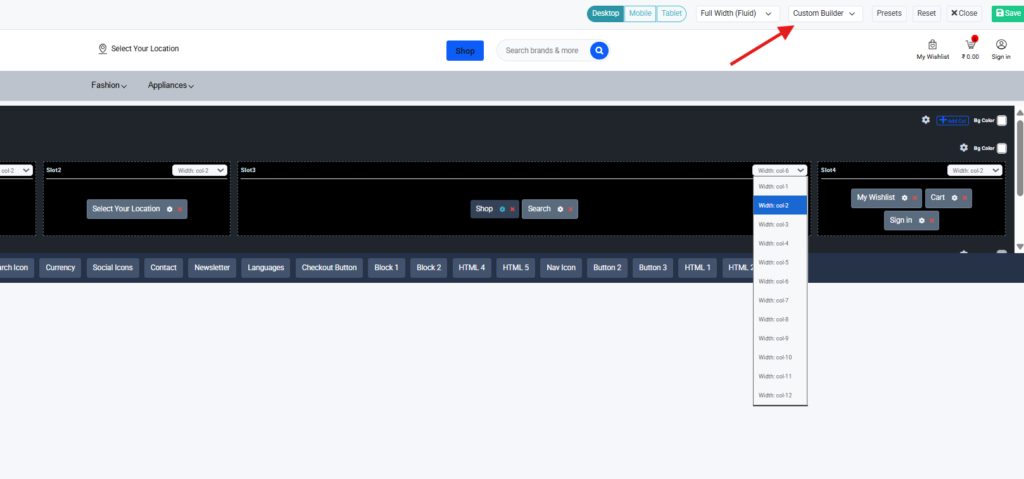
The Custom Builder gives merchants complete freedom to design their header exactly way they want. Instead of working within predefined layouts, store owners can create navigation experiences that match their brand identity, business goals, and customer expectations.
While templates and presets provide a quick and convenient starting point, some businesses need more control over how their navigation is structured.This is where the Custom Builder becomes one of the most powerful features of the new Wcart Header Builder.
Merchants can simply drag and drop components into place, rearrange layouts, and make changes in real time.
With the Custom Builder, You Can:
- Add or remove header elements instantly
- Rearrange components using drag-and-drop controls
- Create multiple rows for better organization
- Adjust layouts to match your branding
- Build different structures for different business needs
For example, a merchant could place:
- The logo on the left for brand visibility
- A location selector beside the logo
- A large search bar in the center
- Wishlist, cart, and account access on the right
Layout Controls for Greater Design Freedom
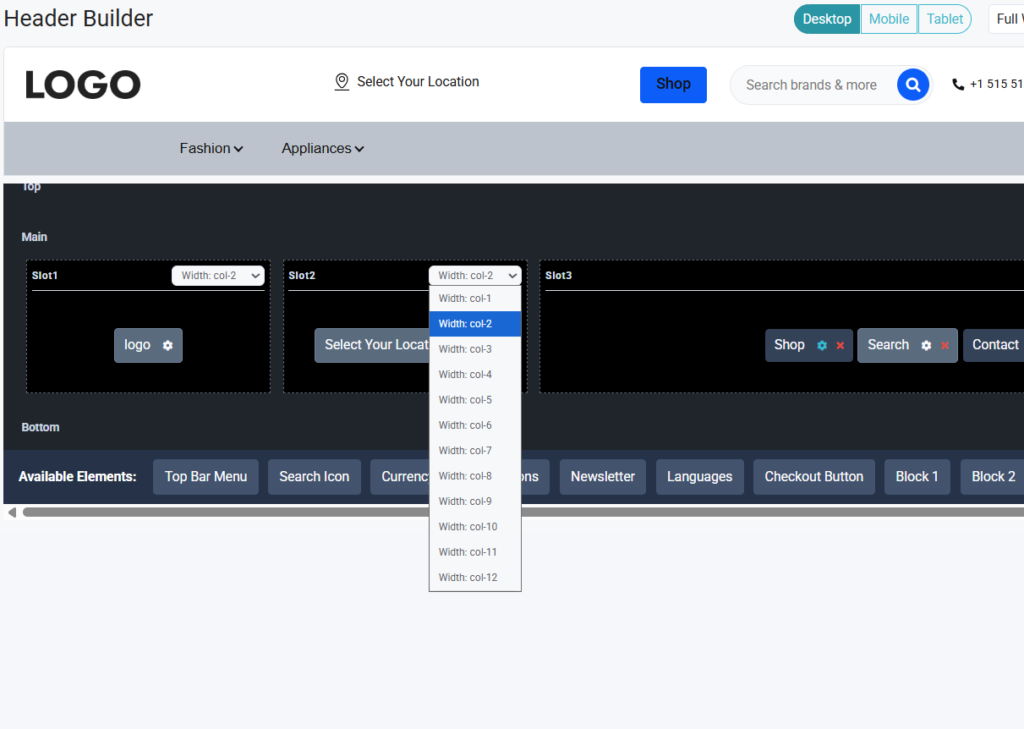
Creating an effective header isn’t just about choosing the right elements it’s also about arranging them in a way that feels organized and easy to navigate. Different businesses have different priorities, which means the same header components may need completely different layouts.
In Custom Header Builder feature includes advanced layout controls that allow merchants to customize column widths, spacing, and positioning without requiring any coding .
Key Layout Features
- Adjustable column widths
- Multi-row header layouts
- Full-width and container layouts
- Flexible element positioning
- Better spacing and alignment controls
These layout controls help merchants create clean, professional, and user-friendly headers that are optimized for both branding and customer navigation, without requiring any coding knowledge.
Build Navigation Around Your Customers Using Drag-and-Drop Elements
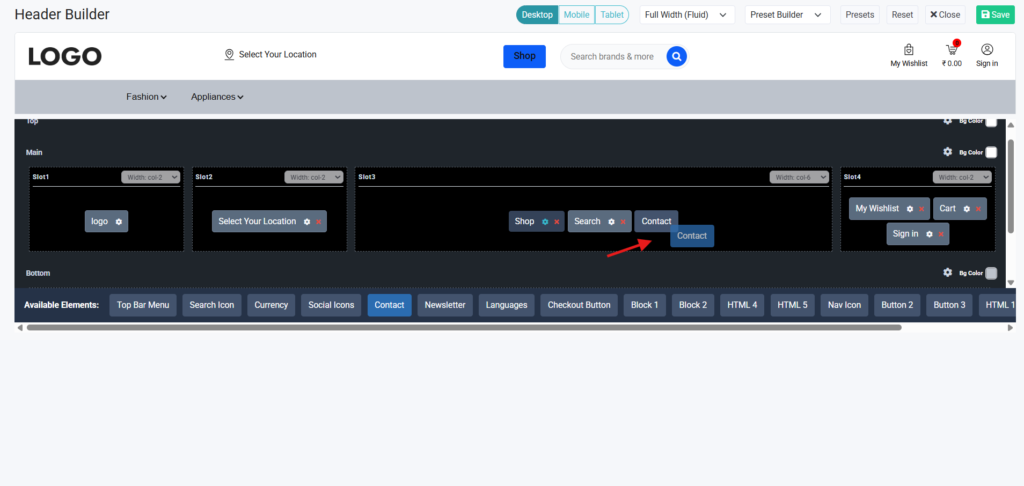
Instead of being restricted to a predefined structure, merchants can choose which elements appear in the header and where they should be placed.
Available elements include:
- Logo
- Main Menu
- Search
- Wishlist
- Shopping Cart
- Sign In / My Account
- Location Selector
- Currency Switcher
- Language Switcher
- Social Media Icons
- Newsletter Section
- Custom Buttons
- HTML Blocks
- Checkout Button
For example, a large electronics store can place search prominently in the center of the header to help customers locate products quickly. A fashion brand can focus on category navigation and promotional banners to encourage product discovery.
Read more: Explore about Increasing Your Ecommerce Conversion rates
Responsive Header Design for Desktop, Tablet, and Mobile
Today’s customers switch between multiple devices throughout their shopping journey. They might discover a product on their smartphone, continue browsing on a tablet, and complete their purchase later on a desktop. Because of this, navigation needs to deliver a smooth and consistent experience across every screen size.
The Wcart Header Builder includes dedicated customization options for desktop, tablet, and mobile devices
Desktop Header Customization
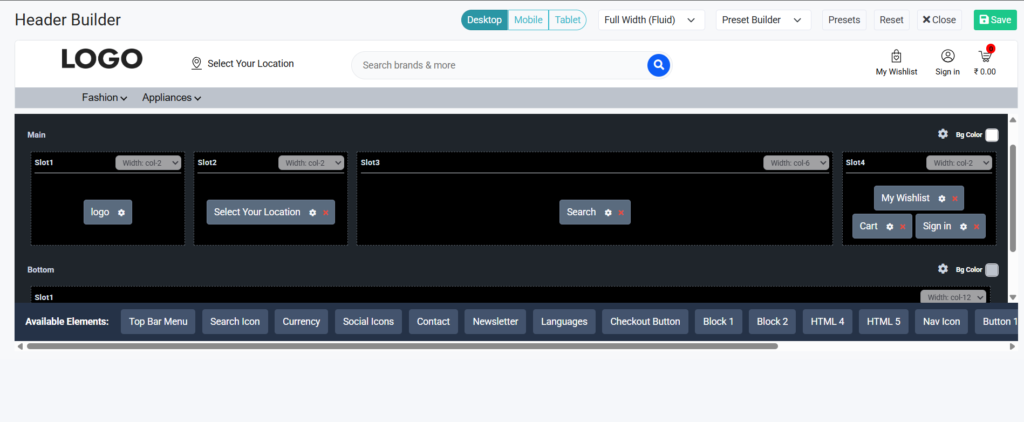
Desktop users typically have more screen space available. This allows businesses to display larger navigation menus, promotional content, category structures, and advanced search functionality.
Tablet Header Customization
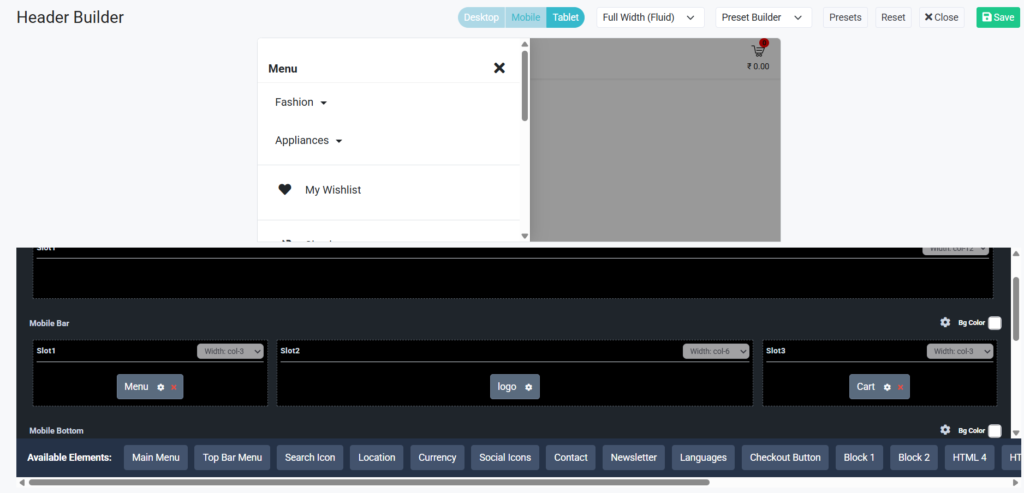
Tablet users often interact differently than desktop users. The available screen space sits somewhere between desktop and mobile, which requires a balanced navigation structure.
Mobile Header Customization
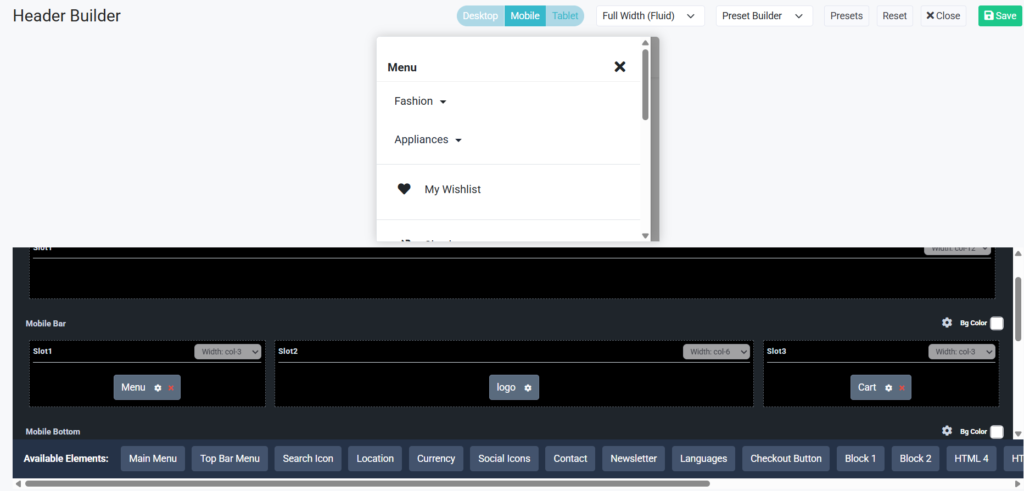
Mobile traffic continues to dominate ecommerce. For many businesses, more than half of all visitors visited through smartphones. This makes mobile navigation one of the most important aspects of the shopping experience.
Advanced header customization
If you’re building out a beauty store, also explore top skincare ecommerce themes for 2026 — the right theme and a well-built header work together to reduce bounce rate significantly.
Wcart vs Shopify, WooCommerce, and Wix: Header Customization Compared
| Feature | Wcart | Shopify | WooCommerce | Wix |
| Built-In Header Templates | 10 Templates | Theme Dependent | Theme Dependent | Limited |
| Visual Header Editing | Yes | Available in Many Themes | Builder Dependent | Yes |
| Drag-and-Drop Customization | Yes | Theme Dependent | Page Builder Dependent | Yes |
| Device-Specific Controls | Yes | Limited | Depends on Builder | Basic |
| Ecommerce Components | Built-In | Built-In | Plugin Dependent | Limited |
| Advanced Layout Controls | Yes | Theme Based | Builder Based | Basic |
| Coding Required for Advanced Changes | No | Sometimes | Often | Rarely |
Conclusion
Good navigation systems are the first step to a good eCommerce experience. Easy product discovery, browsing categories and quick access to important information helps customers stay engaged and complete their purchases.
The new Wcart Header Builder gives merchants to build navigation experiences that fit their business needs and customer expectations. Businesses can create functional, user-friendly headers using ready-made templates, drag-and-drop customization, responsive controls and advanced layout options.
As your store grows, your navigation can grow with it helping you deliver smoother shopping journeys, stronger customer engagement, and a better overall ecommerce experience.
Future-proof Your Brand Today with a Powerful White Label Ecommerce Platform!
Frequently Asked Questions(FAQs)
Related guide: Store Design & Themes on Wcart the complete hub.

























Leave a Reply