
Wcart lets you design your ecommerce store design with no code, using an AI theme builder, ready-made themes, drag-and-drop header and footer builders, full mobile control, custom CSS/JS for fine-tuning, and headless theming via API for teams that want total control. You design under Appearance /Layout setting / Store Design.
The point is not “pretty” it’s a fast, on-brand, mobile-first store that builds trust and converts, because design is the first thing a shopper judges and the last thing they forgive.
Your storefront design is a conversion decision
Shoppers form a trust judgment about your store in seconds, mostly from how it looks and how fast it loads. A clean, fast, mobile-first design lifts conversion; a cluttered or slow one quietly loses sales before anyone reads a product description. Wcart’s design tools exist so you can ship a store that looks credible and loads fast without hiring a developer.
Ready to Design Your Ecommerce Store?
Create a fast, mobile-first storefront with Wcart’s AI theme builder, ready-made themes, and drag-and-drop design tools—without needing a developer.
The ways you can design a Wcart Ecommerce store design
1. AI theme builder
Describe your brand and Wcart’s AI generates a starting storefront layout, sections and styling that you then refine. It’s the fastest path from “nothing” to “a real-looking store,” especially for founders who aren’t designers.
2. Ready-made & industry themes
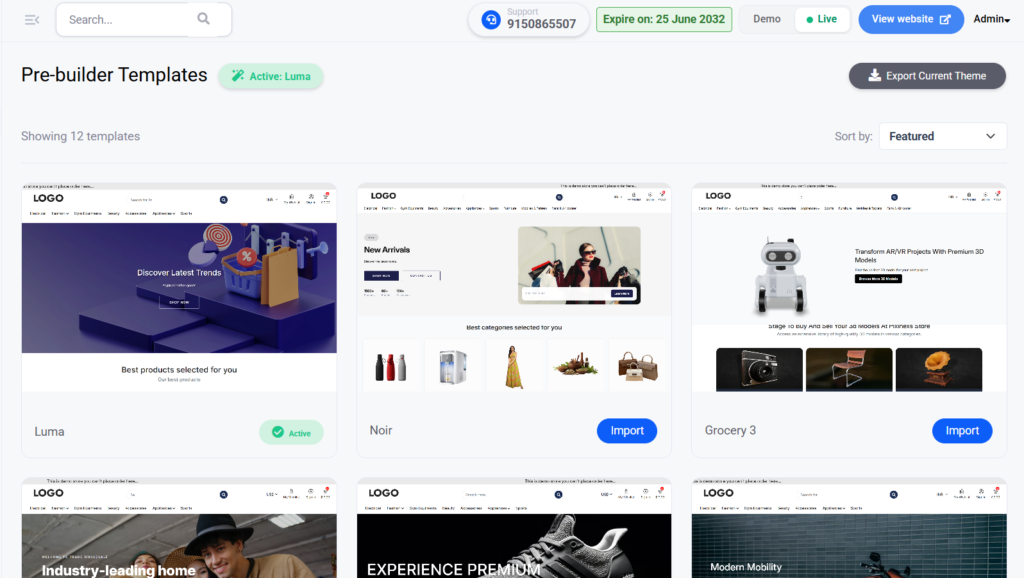
Start from a professionally designed theme and customise. Wcart offers themes tuned to specific verticals for example a skincare ecommerce theme or a fashion & lifestyle theme so you begin with a layout already suited to your products.
3. Header builder
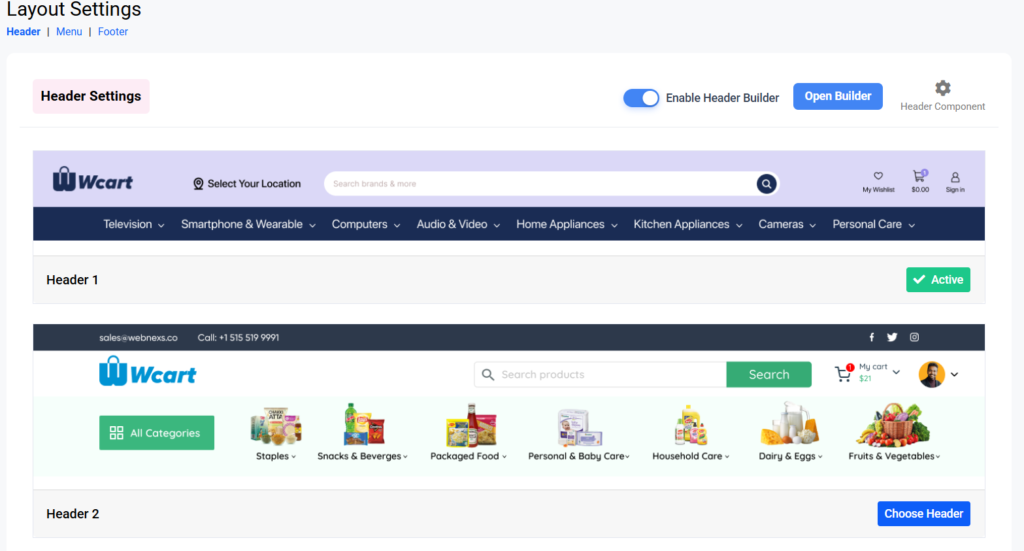
Your header carries navigation, search and cart the most-used elements on the site. Wcart’s drag-and-drop header builder lets you arrange them without code. See advanced header customization for what’s possible.
4. Footer builder
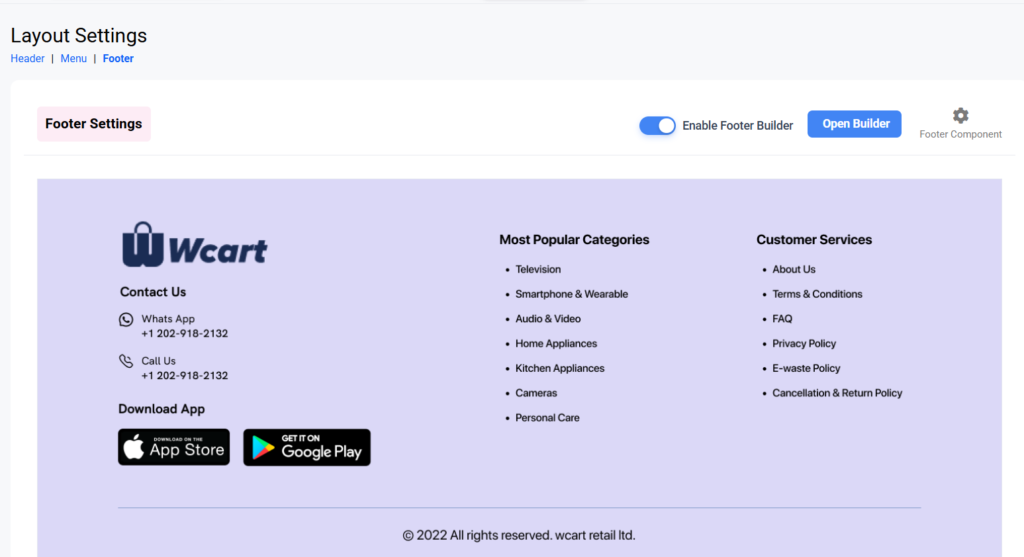
The footer is where trust links, policies, contact and newsletter signup live and it’s prime real estate for SEO internal links. Build it visually with the footer builder, no developer required.
5. Mobile-first control
Most ecommerce traffic is mobile, so Wcart lets you control the mobile layout specifically not just shrink the desktop. Tune what shows, the order of sections, and tap targets so the phone experience is genuinely good, not an afterthought.
6. Custom CSS / JS
When you need pixel-level control, drop in custom CSS or JavaScript to fine-tune anything the visual tools don’t cover without forking the whole theme.
7. Headless theming via API
For teams that want a fully custom front end (Next.js, a mobile app, or a unique experience), Wcart’s headless / API-first architecture lets you build any storefront and use Wcart purely as the commerce backend. Maximum flexibility for those who want it; no-code simplicity for everyone else.
How to design your store in Wcart
- Start from the AI builder or a theme close to your vertical.
- Set brand basics logo, colours, fonts – so everything inherits them.
- Build your header (nav + search + cart) and footer (trust + policies + links).
- Tune the mobile layout explicitly and test on a real phone.
- Add custom CSS only for the last 5% the visual tools don’t reach.
- Check load speed – compress images, limit heavy widgets. Speed is design.
Design mistakes that cost sales
- Designing desktop-first – your majority-mobile buyers get the leftovers.
- Slow, image-heavy pages – every second of load time costs conversion.
- Cluttered navigation – if buyers can’t find it, they can’t buy it.
- Weak footer – missing trust/policy links hurts both conversion and SEO.
- Over-customising before launch – ship a clean theme, then iterate on data.
Explore the Store Design cluster
- Ecommerce Footer Builder
- Advanced Header Customization
- Skincare Ecommerce Theme Guide
- Fashion Ecommerce Theme
Frequently asked questions
Can I design a Wcart store without code?
Yes. Use the AI theme builder, ready-made themes, and drag-and-drop header/footer builders , no developer needed. Custom CSS/JS is available when you want finer control.
Does Wcart support headless / custom front ends?
Yes. Wcart’s API-first architecture lets you build a fully custom storefront (e.g. Next.js or a mobile app) using Wcart as the commerce backend.
Is the mobile layout separate from desktop?
Yes. You can control the mobile layout specifically what shows, section order and tap targets rather than just shrinking the desktop view.
Can I start from a theme for my industry?
Yes. Wcart offers vertical-specific themes (e.g. skincare, fashion) so you begin with a layout suited to your products, then customise.
Deep dive: AI Theme Builder in Wcart

























Leave a Reply