

Quick Answer
WhatsApp Commerce is the use of WhatsApp to connect product discovery, customer conversations, shopping, ordering, payments, and post-purchase support into a single conversation. Most businesses use it to bring the customer’s shopping journey into WhatsApp. A newer, less talked-about layer is bringing part of the merchant’s side into WhatsApp too, managing products, store information, and orders through the same conversational interface, instead of a separate admin dashboard.
Key Takeaways
- WhatsApp messages achieve a 98% open rate, versus 20-25% for email, and 80% of messages are read within 5 minutes of delivery. (Source: Sendseven,)
- Well-run WhatsApp conversational commerce flows convert at 45-60%, up to 12x higher than traditional digital channels. (Source: Splashify,)
- WhatsApp catalog browse-to-purchase conversion reaches 18%, according to Meta Commerce Report and Shopify 2026 data. (Source: SearchLab via Meta Commerce Report,)
WhatsApp commerce isn’t just about customer support anymore. Businesses are now running full order flows, catalog browsing, payments, and post-purchase follow-ups through the same app their customers already use to message friends and family.
This guide walks through every part of that operation, from the basics of setup to the more advanced flows that actually move revenue.
What Is WhatsApp Commerce?

WhatsApp Commerce combines five things that used to live on separate tools into a single conversation: product discovery, customer questions, catalog browsing, the cart-and-checkout flow, and after-sale support.
It typically combines five things:
- Discovery -customers find a business through an ad, a search, or a shared link
- Conversation – customers ask questions directly, in plain language
- Shopping – customers browse a catalog or product list inside the chat
- Transaction – customers add items, place an order, and pay
- Relationship – businesses handle support and repeat orders in the same thread
A customer can go from “do you have this in blue?” to a confirmed order without ever leaving the chat thread.
WhatsApp now counts more than 3 billion monthly active users worldwide, and more than 200 million businesses use WhatsApp Business globally.(Source: Meta via Splashify,)
That scale is exactly why platforms are racing to build real commerce flows catalogs, carts, payments directly into the app instead of treating WhatsApp as just a support inbox.
How WhatsApp Commerce Works for the Customer
The customer-facing journey generally follows a consistent shape, regardless of which business or industry is involved:
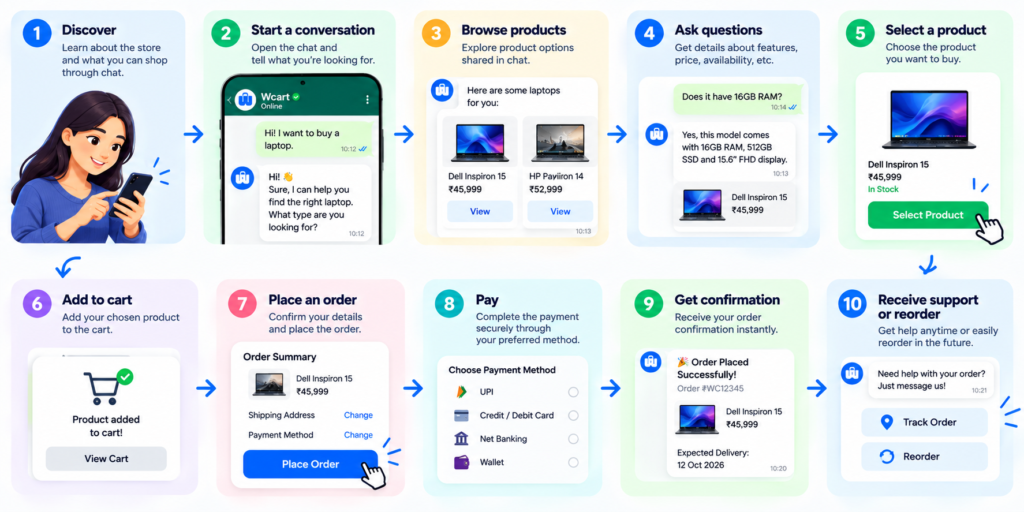
Each step happens inside the same chat thread. There’s no tab-switching between a product page, a cart page, and a checkout page, the way there is on a typical website.
This is also the point where it’s worth drawing a line between two things people often blur together: WhatsApp-assisted selling and WhatsApp Commerce proper.
WhatsApp-assisted selling looks like this:
Customer: “Do you have this product?”
Seller: “Yes.”
Customer: “What’s the price?”
Seller: “₹799.”
Customer: “How do I order?”
Seller: [manually handles the rest]
It works, but every step depends on a human replying in real time.
WhatsApp Commerce replaces most of that manual back-and-forth with structured flows: a real catalog, an in-chat cart, and a payment step, so the seller isn’t typing every answer by hand.
Customer-Side vs. Seller-Side WhatsApp Commerce

Laid side by side, the asymmetry becomes obvious:
| Customer-Side (well covered elsewhere) | Merchant-Side (the gap) |
| Discover a product | Add a product |
| Browse the catalog | Update product details |
| Ask questions | Update store information |
| Select and add to cart | Manage the storefront |
| Place an order, pay | Manage incoming orders |
| Get support, reorder | Maintain the store over time |
Most WhatsApp Commerce platforms are built almost entirely around the left column. The customer gets a conversational experience; the merchant still goes back to a traditional dashboard to keep that experience running.
Wcart WhatsApp Commerce: Conversational Store Management

This is where one platform’s approach to that question is worth a closer look, as a concrete example rather than a hypothetical.
Wcart WhatsApp Commerce connects WhatsApp directly to a merchant’s ecommerce store backend, letting store owners build and maintain their online store through conversational instructions, instead of depending entirely on a traditional admin dashboard.
How Wcart WhatsApp Commerce Works for Sellers, in practice
The pattern is simple: a merchant sends an instruction, Wcart asks for any missing details, and the store updates.
Example — adding a product
Seller: “Add a new black hoodie.”
Wcart: “What’s the price?”
Seller: “₹1,499.”
Wcart: “Product added.”.”
The underlying idea is straightforward: conversation → instruction → store action. No settings menu in between.
Another Example: Updating a Product
Seller:
Change the price of the Classic Cotton Shirt to ₹699.
Wcart:
The product price has been updated to ₹699.
The important concept isn’t the individual command.
It’s that the seller can interact with the ecommerce system using a familiar conversational interface.
What you can manage this way
- Product management – adding products, editing details, updating prices
- Store management – updating store content and storefront information
- Order management – checking and handling order-related activity
- Customer interactions – responding to product questions directly in chat
This isn’t a replacement for the dashboard entirely, it’s a second way into the same store, suited to the frequent, smaller tasks that make up most of a merchant’s week.
How to Get Started With WhatsApp Commerce on Wcart

Getting set up follows a much shorter path than the generic version above, since catalog, store, and messaging all run through one connected system.
Step 1: Connect Your WhatsApp Number to Your Wcart Store
Link the WhatsApp number you want to use for your store from your Wcart dashboard. This is a one-time verification step. Once connected, Wcart recognizes messages from that number as authorized store instructions.
Step 2: Build or Import Your Product Catalog
You have two options here, use whichever fits where you’re starting from:
- Starting fresh – add products conversationally through WhatsApp, one at a time, as covered in the walkthrough above
- Already have a product list – bulk import your catalog with a CSV instead of adding everything one message at a time
Step 3: Set Up Your Store Details
Through the same chat, set the basics your customers will see, store name, description, and contact information, so your store is ready to represent your business from day one.
Step 4: Turn On Customer-Facing WhatsApp Selling
This is where the customer-side journey covered earlier in this guide comes in, discovery, catalog browsing, cart, and checkout, all running on the same WhatsApp number you just connected.
Step 5: Start Managing the Store From the Same Conversation
From here, day-to-day store tasks run through the same chat: updating prices, adding new arrivals, checking orders, and making routine changes, without a separate dashboard login for each one.
Step 6: Use the Dashboard When You Need It
Nothing about setting up this way locks you out of the dashboard. For visual work, like picking a theme or arranging a layout, it’s still there whenever that’s the easier path.
WhatsApp Commerce vs. Traditional Ecommerce for Sellers
From the seller’s perspective, the difference is not only where the customer shops. It is also how the business manages the selling process.
| Traditional Ecommerce | Seller-Side WhatsApp Commerce |
| Seller manages products through an admin dashboard | Seller can manage supported store tasks through conversation |
| Customer communication happens separately | Customer communication and commerce happen through WhatsApp |
| Product updates require dashboard navigation | Supported updates can be given through chat |
| Orders and conversations may exist in separate systems | Commerce interactions can stay closer to the conversation |
| Seller switches between tools | Fewer context switches |
| Store management is dashboard-first | Store management can become conversation-first |
Benefits of WhatsApp Commerce for Sellers
The benefits are different when we look at WhatsApp Commerce from the merchant’s side.
1. Manage customers where conversations already happen – Sellers can communicate with customers without moving between a separate messaging platform and their ecommerce workflow.
2. Reduce repetitive store-management steps – For supported tasks, sellers can give instructions conversationally instead of navigating through multiple dashboard screens.
3. Make product updates easier – Sellers can make routine product changes through a conversational workflow, helping them keep their store information current.
4. Respond to customers faster – Because customer questions and commerce interactions happen in the same environment, sellers can respond while the customer is actively considering a purchase.
5. Keep store operations closer to customer conversations – Instead of treating customer communication and store management as completely separate activities, WhatsApp Commerce can connect the two.
WhatsApp Commerce Use Cases for Sellers

Different businesses can use seller-side WhatsApp Commerce in different ways.
- Fashion Sellers – A fashion seller can communicate with customers about sizes, colours and availability while also keeping product information updated.
- Beauty Businesses – Beauty sellers can answer product questions, recommend suitable products and continue the conversation through the purchase journey.
- Grocery Businesses – A local grocery seller can receive product requests, manage orders and communicate delivery information through WhatsApp.
- Electronics Sellers – Electronics often involve more questions before purchase. Sellers can discuss specifications, availability and pricing while handling the resulting order.
- D2C Brands – A D2C brand can bring customers from social media into WhatsApp and continue the journey from product discovery to purchase.
- Local Retailers – A retailer that already receives customer enquiries through WhatsApp can use the same channel as part of its online selling workflow.
WhatsApp Commerce Challenges for Sellers
This section is important because it makes the article more credible.
1. Growing product catalogs – Managing a handful of products is easy. Managing hundreds or thousands requires a proper system.
2. Too many conversations – More customers mean more messages, which can quickly become difficult for one seller to manage.
3. Inventory accuracy – If the WhatsApp experience shows outdated availability, customers can lose trust.
4. Order management – As order volume increases, sellers need a reliable way to track and manage orders.
5. Switching between systems – A seller may need WhatsApp for customers, an ecommerce dashboard for the store and another system for other operations.
6. Store maintenance – Even after setting up WhatsApp selling, the underlying online store still needs regular updates.
Wcart WhatsApp Commerce: From Conversation to Store Management
Your customers are already on WhatsApp. Why shouldn’t your store be there too?
Build → Manage → Maintain → Sell — all through a conversational workflow, instead of a dashboard you have to open separately from the conversations you’re already having.

























Leave a Reply