

Building a website in 2026 is easier than ever. Today more than 70% of small businesses use website builders to launch online. But choosing the right website builder can still be confusing.
Find a powerful ecommerce website builder.
Each and every platform says it offers better design, faster setup, and powerful ecommerce features. But many businesses later face problems like poor SEO, expensive plugins, limited customization, or platforms that struggle for they business grows.
Today, a website is not just about looking good online. It plays a big role in your search rankings, customer experience, online sales, and overall business growth. That is why selecting the right website builder is important from the beginning.
To make things easier, we compared the best website builders based on:
- ease of use
- ecommerce features
- SEO tools
- customization
- integrations
- pricing
- real business usage
Some platforms are great for beginners starting their first website, while others are better for the growing ecommerce businesses and large online stores. In this guide, we break down the best website builders in 2026 to help you find the right platform for your business needs.
What is a Website Builder?
A website builder is a tool that helps you create a website without coding. You can use templates drag and drop tools or AI.
In simple words a website builder helps you create a website quickly without technical skills.
Most modern website builders allow businesses to:
- Create Pages Visually –Design and arrange website pages easily using drag and drop editing tools without coding knowledge.
- Manage Products –Add, organize, update, and track products from a single dashboard for smoother store management.
- Publish Blogs – Create and publish blog content to share updates, improve SEO, and attract more visitors.
- Accept Online Payments –Receive payments securely through multiple payment gateways for online sales and transactions.
- Customize Website Layouts –Modify colors, sections, fonts, and page structures to match your brand style and business needs.
- Optimize Content for Search Engines – Improve website visibility on Google by managing SEO settings, keywords, metadata, and page structure.
- Monitor Website Performance –Track website traffic, visitor behavior, and sales performance to understand how your website is growing.
Website builders are now used for far more than personal websites. Many businesses run complete ecommerce operations using these platforms, including inventory management, customer accounts, shipping systems, and online marketing.
The biggest reason website builders became popular is speed. Businesses can launch websites much faster compared to traditional custom development. This makes them especially attractive for startups and small businesses that want to go online quickly without hiring large technical teams.
How We Evaluated These Website Builders
Every website builder has its own strengths and weaknesses. Some are easier for beginners while others are better for large ecommerce stores or businesses needing deeper customization.To make this comparison useful, we evaluated each platform based on real business requirements rather than marketing claims alone.
Ease of Use
One of the first things businesses notice is how easy a platform feels during setup and daily management. Some website builders simplify everything through guided onboarding and visual editing, while others require more time to learn. We looked at dashboard experience, navigation, editing tools, learning curve, template management, and overall usability for beginners and growing businesses.
Ecommerce Features
Ecommerce functionality matters even for businesses that are not purely online stores. Many companies now sell products, memberships, services, or digital content directly from their websites. We compared product management, payment options, inventory handling, order management, checkout experience, multichannel selling, and overall ecommerce capabilities.
SEO Features
Search visibility continues to be one of the biggest traffic sources for businesses online. A website builder should make it easy to optimize pages for search engines without creating technical limitations. We analyzed metadata controls, URL structure, mobile optimization, page speed performance, blogging functionality, image handling, and SEO customization options.
Design and Flexibility
Businesses eventually need changes as they grow. Some website builders allow deep customization while others become restrictive once businesses need advanced functionality. We reviewed theme flexibility, developer controls, app ecosystems, integrations, and customization options available on each platform.
Pricing and Long Term Value
Many platforms appear affordable at first but become expensive as businesses grow. Third party apps, transaction fees, premium themes, and advanced features can increase monthly costs significantly over time. We evaluated pricing transparency, upgrade requirements, hidden expenses, and overall long term value.
Ecommerce Website Builders Comparison
| Platform | Best For | Ease of Use | SEO | Scalability |
| Wcart | Advanced ecommerce and scaling | Medium | Advanced | High |
| Webnexs | Enterprise ecommerce solutions | Medium | Advanced | High |
| Shopify | Ecommerce stores | Easy | Good | High |
| Wix | Beginners | Very Easy | Basic | Medium |
| Squarespace | Design and portfolios | Easy | Good | Medium |
| Hostinger Builder | Budget users | Easy | Basic | Low |
| WooCommerce | Full control | Medium | Advanced | High |
Read more: Essential Ecommerce Website Features
Top Best Website Builders in 2026
1. WCART Best All in One Ecommerce Builder for Startups
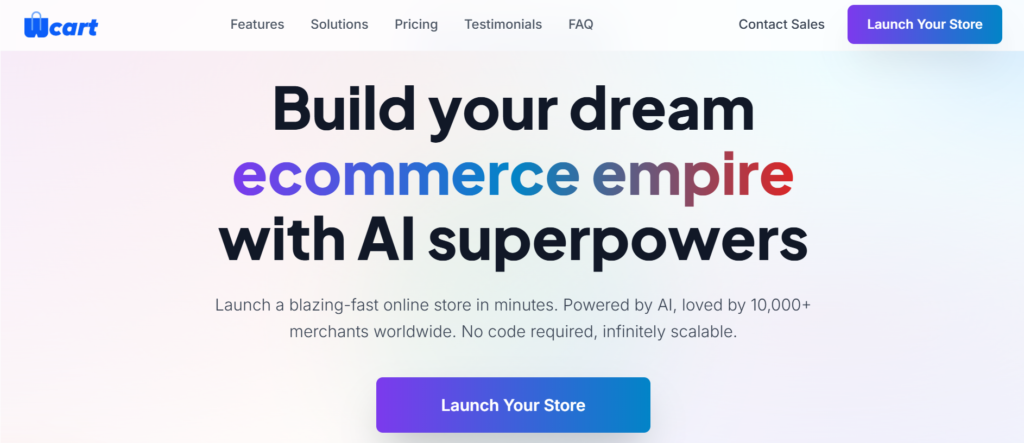
Wcart is designed for businesses that want to build strong ecommerce websites instead of simple informational sites. It designed specifically for supporting the daily activities associated with operating an eCommerce business, including fulfilling customer orders online and managing product inventory.
Unlike beginner focused website builders that mainly focus on quick website setup, Wcart is structured more like a complete ecommerce management system. Businesses handling large product catalogs, multivendor marketplaces, or multiple customer orders can manage everything from a single dashboard without depending heavily on third party tools.
- Store Management Experience –The dashboard focuses more heavily on ecommerce operations compared to basic website editing. Product handling, order tracking, and storefront management are given greater priority.
- SEO and Content Control — Users have more flexibility when managing URLs, product metadata, category structures, and other ecommerce related SEO settings. This helps businesses organize large product catalogs more effectively.
- Scalability for Growing Stores — Many businesses eventually outgrow beginner website builders once traffic and inventory increase. Wcart is designed to support businesses planning long term ecommerce expansion without rebuilding infrastructure later.
- Who It Works Best For — Wcart is better suited for growing ecommerce brands, multivendor marketplaces, and businesses expecting operational complexity as they scale.
- Limitations — The platform may feel more advanced for beginners who only need a simple brochure style website or small portfolio site.
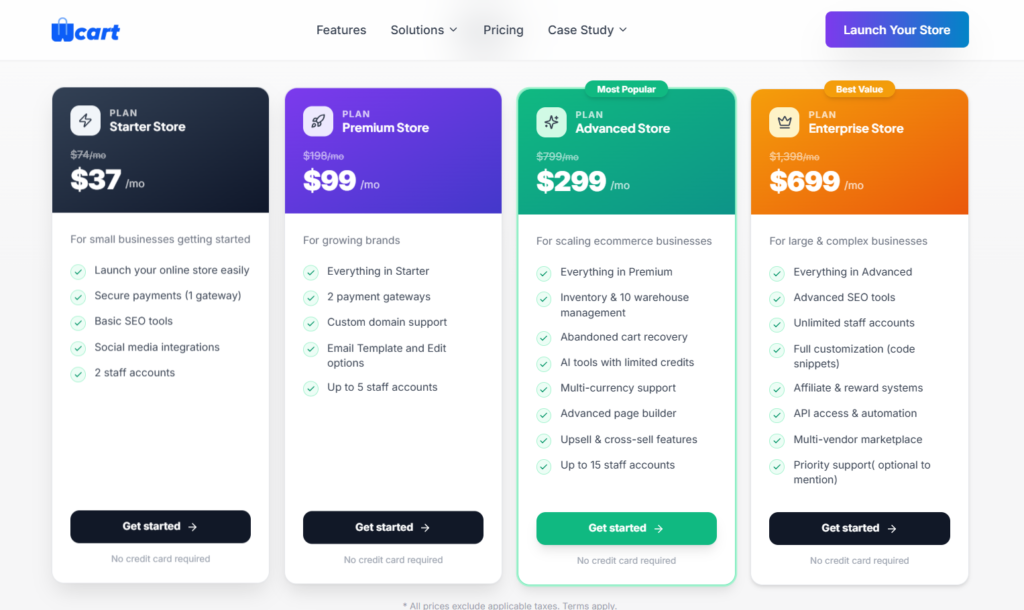
Pricing and Cost:
2. Webnexs – Best for Enterprise Ecommerce Solutions
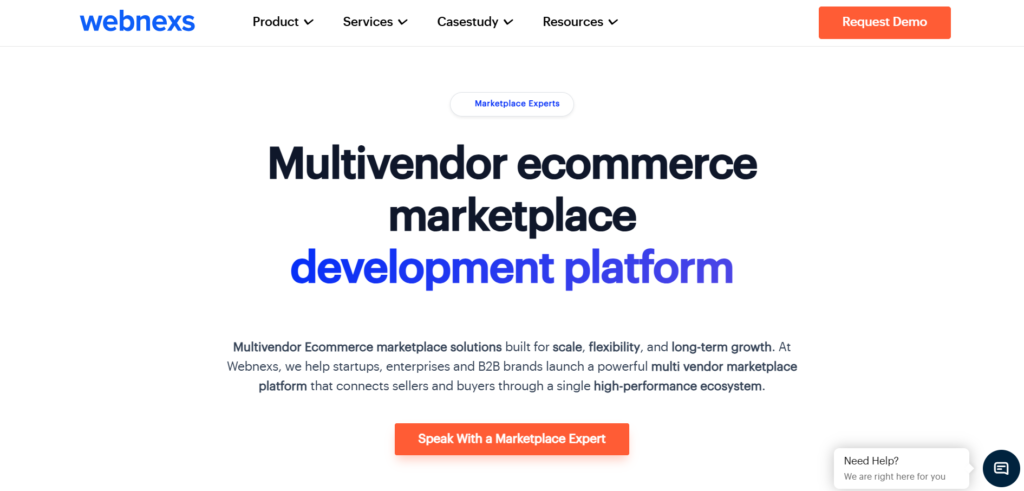
Webnexs is an ecommerce platform designed for large businesses and enterprise level operations. One of the biggest advantages of Webnexs is its ability to support customized ecommerce experiences.
Unlike beginner website builders that focus mostly on simple store setup, Webnexs is structured for businesses managing complex ecommerce requirements. It is commonly used by enterprises, B2B companies, multivendor marketplaces, and brands planning large scale online operations.
- Enterprise Ecommerce Management — Webnexs focuses heavily on handling large scale ecommerce operations. Businesses can manage products, orders, customers, vendors, payments, and analytics from a single system.
- Marketplace and B2B Features — Webnexs supports multivendor marketplaces, B2B ecommerce operations, bulk ordering, and advanced product management for larger businesses.
- SEO and Store Performance — Businesses can manage SEO settings, product pages, category structures, and website content more effectively to improve search visibility and user experience.
- Who It Works Best For — Webnexs is suitable for enterprise ecommerce businesses, large online marketplaces, wholesalers, and brands managing high volume online operations.
- Limitations — The platform may feel more advanced for beginners or small businesses that only need a simple website or small online store.
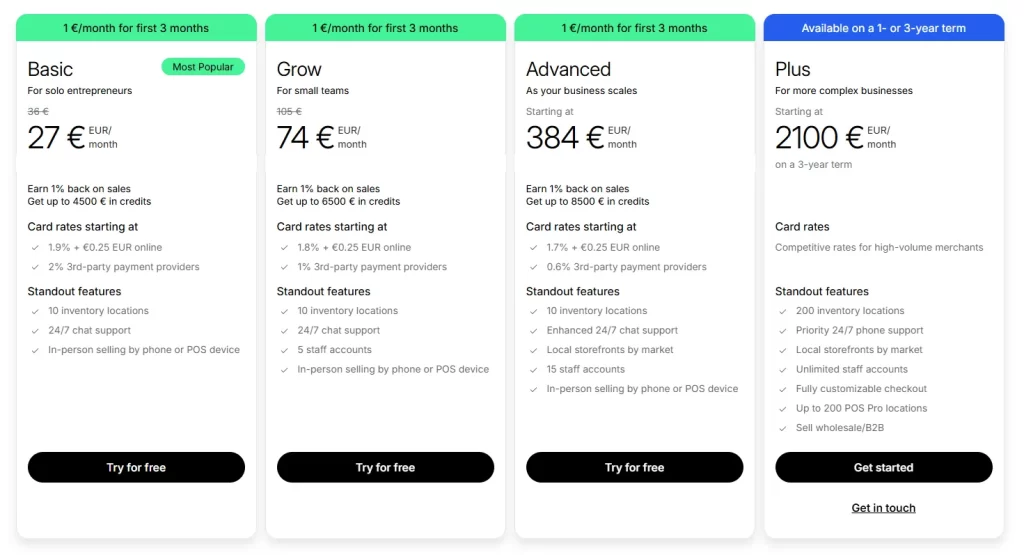
Pricing and Cost:

3. Shopify Best for Fast Scaling Startups

Shopify is a popular ecommerce platform known for ease of use and strong ecosystem.The platform is widely used by startups, direct to consumer brands, dropshipping stores, and growing online retailers.
One reason Shopify became so popular is the simplicity of its setup process. Businesses can launch online stores quickly without worrying about hosting, security, or backend infrastructure. Much of the technical management is handled automatically by the platform.
Website Setup and Usability — The platform is beginner friendly and easy to navigate even for users without technical experience. Most store management tasks can be handled through a clean and organized dashboard.- Ecommerce Features — Shopify supports physical products, digital products, subscriptions, and multichannel selling across marketplaces and social platforms. Inventory management and payment integration are also straightforward.
- SEO and Marketing Tools — Users can manage metadata, create blog content, customize product pages, and optimize websites for mobile users. Shopify also includes built in marketing and analytics tools for ecommerce businesses.
- Long Term Business Growth — The platform works well for businesses expecting increasing order volume because infrastructure scaling is managed automatically.
- Limitations — Monthly expenses can rise quickly because many advanced features require paid applications or premium plans. Businesses wanting deeper customization may also require developer
Pricing and Cost:
4. Wix – Best for Brand Focused Startups
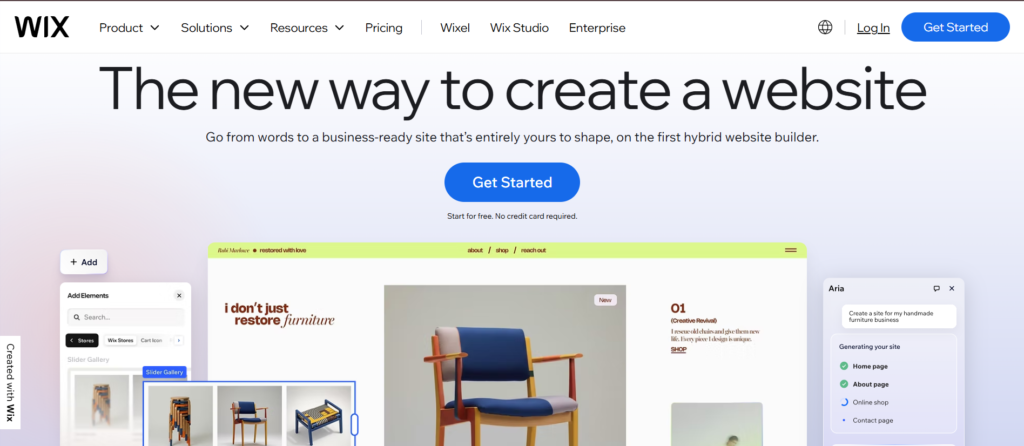
Wix became popular because it made website creation simple for non technical users. The platform focuses heavily on drag and drop editing, visual customization, and beginner friendly website management.
Many freelancers, consultants, local businesses, and small startups choose Wix because websites can be launched quickly with minimal learning.
The platform offers a large template library covering industries such as restaurants, portfolios, agencies, ecommerce stores, fitness businesses, and service providers.
- Website Editing Experience — The drag and drop editor gives users visual control over layouts and page design. Beginners often find Wix easier to learn compared to more ecommerce focused systems.
- Features for Small Businesses — Wix includes blogging tools, ecommerce support, appointment scheduling, contact forms, email tools, and marketing integrations within the platform.
- Ecommerce Functionality — The ecommerce features work well for smaller online stores selling limited product catalogs. Businesses can manage products, payments, and shipping without complicated setup.
- SEO Capabilities — Wix improved its SEO tools significantly over the years. Users can now customize metadata, optimize URLs, manage redirects, and improve mobile performance more easily.
- Limitations — Larger ecommerce businesses may eventually feel restricted once product catalogs, traffic, or customization requirements become more advanced.
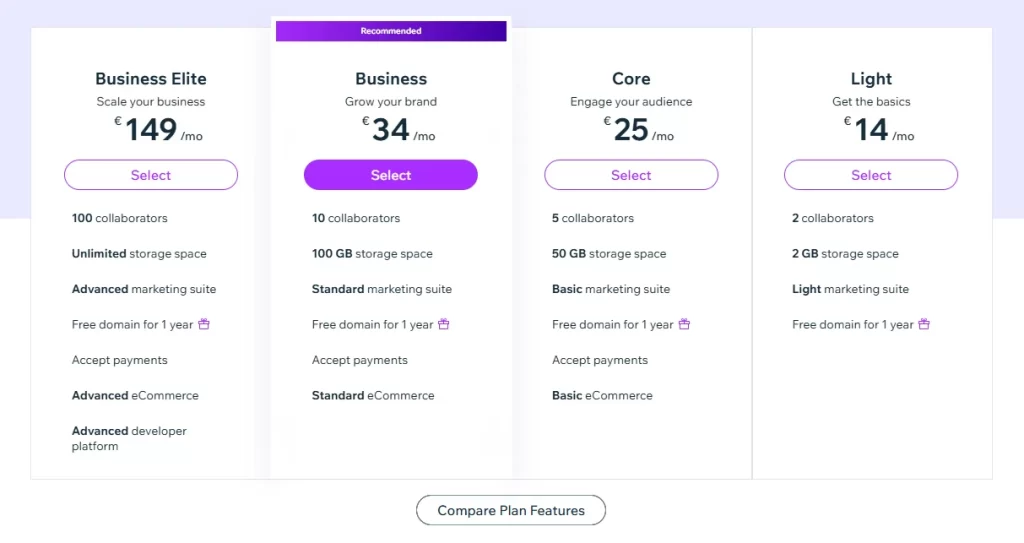
Pricing and Cost:
5. Squarespace Best for Service based Startups

Squarespace is known primarily for clean visual design and branding focused websites. Many photographers, agencies, consultants, creators, and service based businesses prefer the platform because of its modern templates and polished presentation.
The platform focuses heavily on design consistency and simplicity. Websites created with Squarespace often look visually professional even without heavy customization.
Beyond portfolios and content websites, Squarespace also supports ecommerce functionality for businesses selling products, memberships, and digital downloads.
- Design Quality and Branding — Squarespace templates are one of the platform’s biggest strengths. Businesses wanting strong visual presentation often prefer it over more functional ecommerce focused builders.
- Content and Blogging Features — The platform works well for businesses that combine content publishing with ecommerce or service offerings. Blogging and content management tools are integrated directly into the system.
- Ecommerce Support — Squarespace supports online selling, payment processing, digital products, and appointment based services. The setup process is relatively straightforward for smaller businesses.
- User Experience — The dashboard is clean and beginner friendly, making website management less overwhelming for non technical users.
- Limitations — Businesses needing advanced ecommerce workflows, large inventory management, or extensive third party integrations may eventually require more specialized platforms.
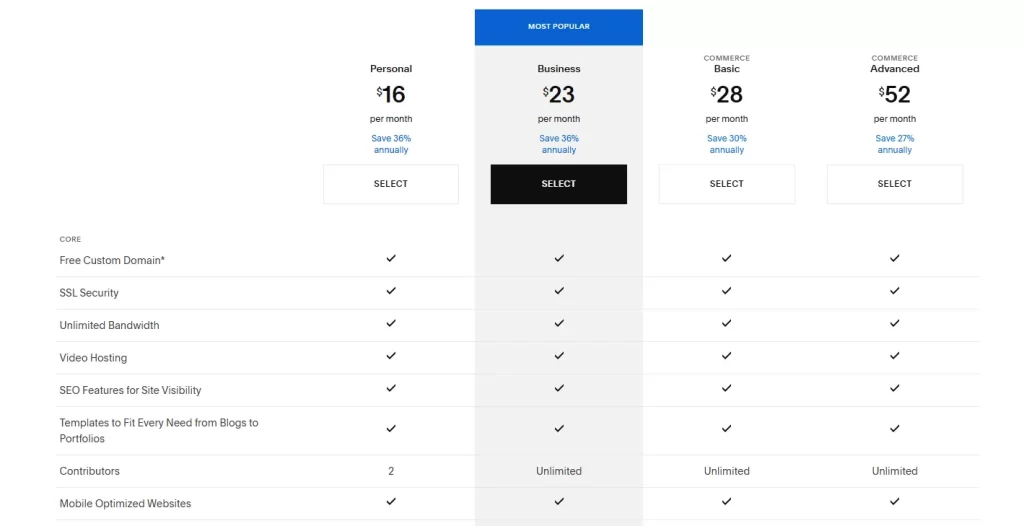
Pricing and Cost:
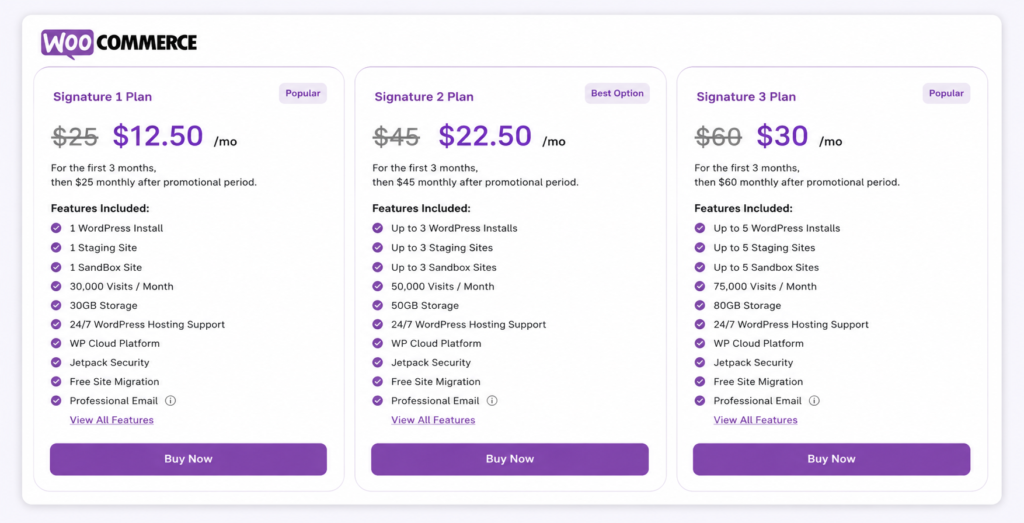
6. WooCommerce Best for Full Custom Control
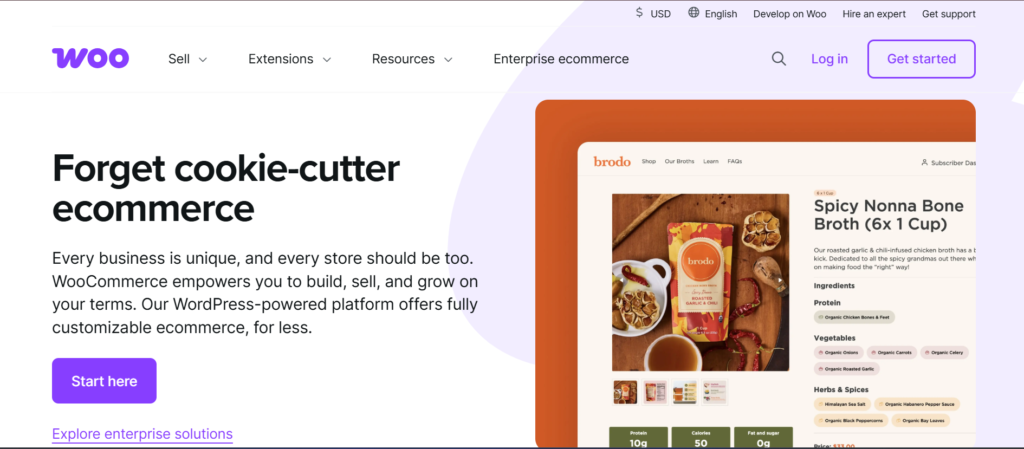
WooCommerce is different from most website builders because it operates through WordPress rather than as a fully hosted platform. Businesses using WooCommerce have far more control over website structure, customization, and backend management.
The platform is especially popular among developers, content driven ecommerce websites, and businesses requiring advanced flexibility. One of WooCommerce’s biggest advantages is ownership control. Businesses can customize almost every aspect of the website through plugins, themes, and direct development work
- Flexibility and Customization — WooCommerce gives businesses deeper control over storefront design, functionality, and ecommerce workflows compared to many hosted website builders.
- SEO Advantages — Many businesses prefer WooCommerce because WordPress provides strong blogging and SEO capabilities. Users can customize URLs, metadata, schema, and technical SEO settings more extensively.
- Ecommerce Capabilities — The platform supports subscriptions, memberships, product variations, inventory management, and advanced ecommerce plugins through the WordPress ecosystem.
- Scalability Potential — WooCommerce can support very large ecommerce websites when configured properly with optimized hosting and performance management.
- Limitations — The platform requires more maintenance responsibility. Businesses need to manage hosting, updates, security, plugin compatibility, and website optimization themselves.
Pricing and Costs
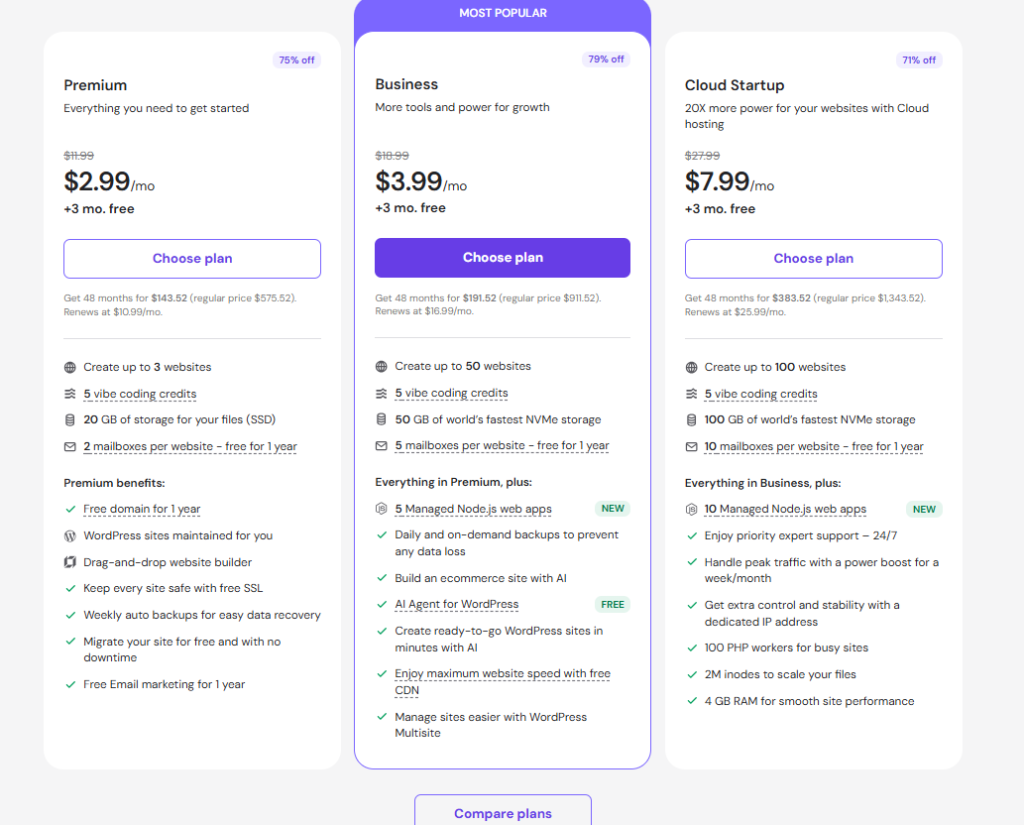
7. Hostinger Website Builder Best for Side Projects

Hostinger Website Hostinger builder is a low cost option for simple websites. The platform is designed mainly for beginners who want a website online quickly without handling technical setup.
The builder includes visual editing tools, templates, hosting, and basic ecommerce functionality within a single package.
- Affordable Website Creation — Hostinger is often chosen by users looking for a lower cost entry point into website creation without major upfront investment.
- Beginner Friendly Setup — The website creation process is simple and designed for users with limited technical knowledge. Templates help speed up the launch process.
- Basic Ecommerce Features — Small online stores can manage products, payments, and simple storefront operations through the platform.
- Website Performance — For smaller websites and lightweight projects, the platform generally performs well and loads quickly.
- Limitations — Businesses expecting large scale ecommerce growth or advanced customization may eventually need a more flexible platform.
Pricing and Costs
Read more: How to make an ecommerce website with online store builder?
AI Website Builders in 2026
Modern builders include:
- AI website design
- AI content creation
- Smart recommendations
- Customer insights
These features save time and improve results.
How to Choose the Right Ecommerce Website Builder

The best platform depends on your business model, technical comfort level, and how you plan to sell. We have broken it down on the basis of types of ecommerce.
Beginners launching simple websites may care most about ease of use and visual editing. Ecommerce businesses usually prioritize inventory handling, payment systems, and product management. Larger brands often focus more on flexibility, integrations, and operational control.
Businesses should also think beyond immediate needs. A platform that works for a small website today may become restrictive later once traffic, products, or customer requirements increase.
For Beginners, Creatives, and DTC Startups
If you are a beginner and new to ecommerce, choose builders with drag and drop features, great templates and all in one tools.
Best choices: Wcart, Wix, Squarespace, Shopify and Hostinger Website Builder
For Dropshipping or Digital Product Stores
Look for platforms that allow automated inventory syncing, seamless supplier integration, and flexible digital delivery.
Best choices: Shopify, Wcart and WooCommerce
For Local Businesses and In-Person Service Sellers
You will be specifically in need of features like appointment booking, service listings, and local SEO tools.
Best choices: WCART, Squarespace, GoDaddy, Square Online and Wix
No matter your business model, the right ecommerce builder should save you time, scale with your growth, and offer support when you need it most.
Final Verdict:
The best ecommerce website builder depends on your experience level budget and business goals. Beginners can start with basic builders like WCART Wix while growing businesses may go into more complex systems like Shopify.
If you utilize the right builder you can launch your online business more rapidly and with confidence.
Before selecting a platform, businesses should evaluate:
- how easy the system feels to manage
- whether ecommerce tools match operational needs
- how flexible the platform becomes as requirements grow
- what additional costs may appear later
- how much control is available for SEO and customization
A website builder is not only a design tool anymore. It becomes part of the business itself, affecting marketing, customer experience, online sales, and future expansion.

























Leave a Reply